How to Activate Your Fansly Downloader License
Paste your Ko-fi license code in the extension options
Last verified 22 August 2026
Installing the Chrome extension from the store is free of a license prompt. Paid features — and the 3-month bulk profile downloader — need a code from Ko-fi. This page is the support path: where the email goes, where you paste the code, and how to look it up if the message never arrived.
Compare what each plan includes on the plans section. There is no silent recurring charge to cancel. When a license expires, buy another one if you still want those features.
Activate the code
- After you purchase on the Ko-fi shop, check your email for a license code, including spam. If it is not there, request it again on the license lookup page (search the checkout email) or contact the developer from About.
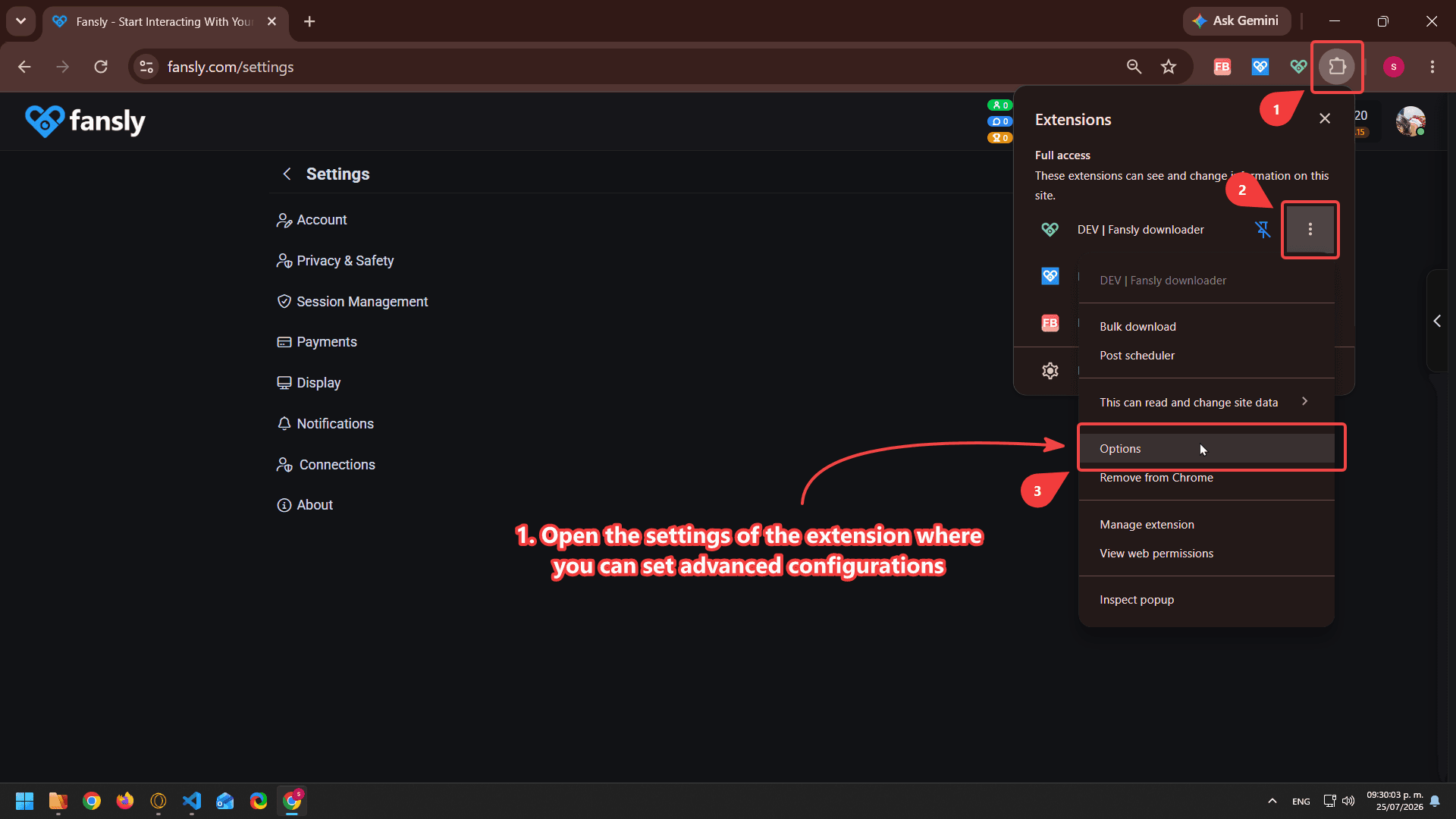
- Open the extension options, where you can change advanced settings. In Chrome: Extensions → Fansly Downloader → Details → Extension options, or the shortcut shown in the screenshot.
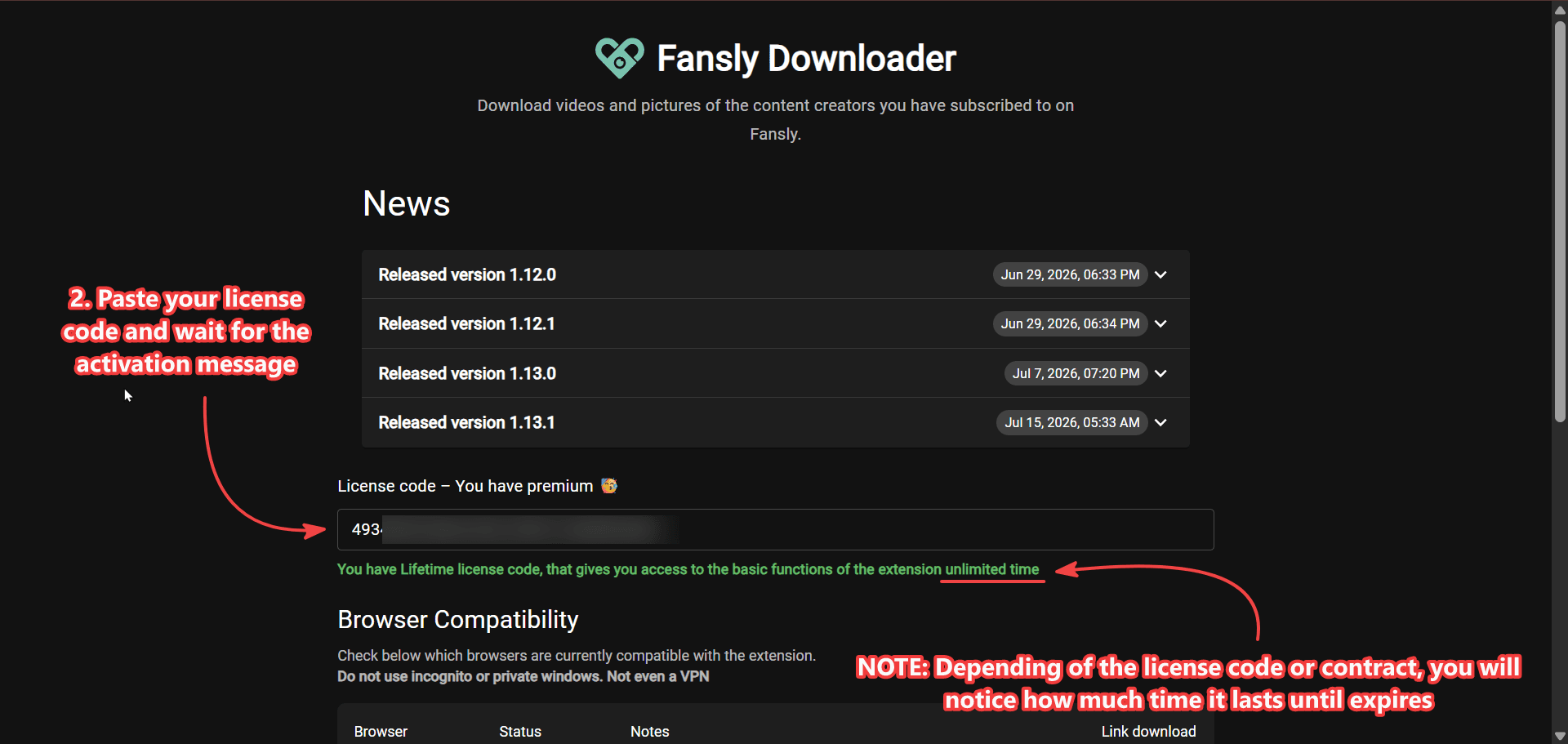
- Paste your license code and wait for the activation message. A typo, an extra space, or a code from a different product will fail. Use the code from the Fansly Downloader purchase, not a Telegram Downloader receipt.
How to Cancel a Plan
There is no recurring payment to cancel. Licenses are one-time purchases. When a license expires, buy another one if you want to continue. This avoids unexpected charges on your payment method. See the plans on the main page.
If activation fails
Confirm the extension is the one from the official Chrome Web Store listing. Confirm you are in the same Chrome profile where you installed it. Try the lookup page with the exact checkout email. If Ko-fi shows a paid order and lookup is empty, write on Telegram from the About page with the order time and the email — do not post the full code in a public group.
A valid license does not unlock media you cannot view on Fansly. It only enables the extension features you paid for. Access rules are explained on the main product page.
After it activates, download a video or, on the 3-month plan, bulk download a profile.
What the license does not change
A paid month does not turn this into an online paste-a-link downloader and does not replace Chrome. You still install the extension, sign in to Fansly, and save media you can already open. The license also does not include Fansly Manager consulting or the Telegram Downloader store listing — those are separate products on programmer51.
Keep the purchase email. The lookup page is a backup, not a reason to delete the Ko-fi receipt. If you switch computers, install the extension on Chrome again and paste the same code. If the old machine still has it enabled, that is fine; the limit you care about is the expiry date, not a single USB stick.
Monthly versus 3 months
Both plans can save photos and videos, including 4K when the file allows it. The 3-month plan adds bulk download on a creator profile and includes updates for that window. The monthly plan is for people who only grab posts or messages by hand and do not need the profile picker. Prices and the checkmarks are on the main page plans.
Buying again after expiry is a new one-time payment, not an automatic renewal you forgot about. If you do not buy again, the extension can remain installed; paid features stop when the code lapses. Free store leftover UI may still be there. That is expected.
Ko-fi is the checkout. programmer51 does not see your card number. The lookup page only finds the row that matches the email you type. Use the same address you used at payment. A nickname on Telegram is not an email and will not find the license.
More product questions: Fansly Downloader FAQ — 4K, Chrome, License. This page is only activation, lookup, and how plans end.